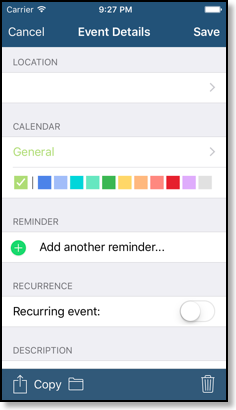




Google’s new “Color Code” function

To use it in CalenGoo, you have to authenticate CalenGoo using “OAuth2” as explained under “Authenticating via OAuth2” here:
Authentication
(Just tap "Settings", "Login screen" to open CalenGoo’s login screen, then tap the gear icon in the lower right corner, choose "OAuth2 Login" and follow the instructions.)
If you already synced using another sync method (e.g. the normal password based method) you might see duplicates after configuring the new sync via OAuth2. Please tap “Settings”, “Reset calendars” once to remove them. It will erase all events and calendars in CalenGoo and re-download everything from Google.
When syncing this way, also your calendar colors will change. You can change them back or choose other colors for your calendars by tapping the blue button behind the calendar’s name under "Settings", "Visibility/Download".