English
Deutsch
Installation
Installation
Password lost
Tutorial
Sync
Data Migration
Sync targets
Without sync
Calendars
Color Code
Working with calendars
Calendar selection bar
Local calendars
Deleting Google calendars
Default calendar
Event Colors
OAuth2
Holidays/Sports
Using Outlook
Icons
Badge
Change account
Multiple Accounts
Shared calendars
New iPhone/iPad
Time format am/pm/24h
Features
Vertical month view
Default duration
Speed
Configuration
PIN lock
Language
Evernote
Apple Watch
Updates
News
Edit
Recurring events
Reminders
SMS reminders
Email reminders
Pop-up reminders
Notification Center
Default reminders
Sharing reminders
Drag&Drop
Deleting events
Copy
Detail view
Prev/Next buttons
Templates
Floating events
Dropbox attachments
Attachments
Snap in to times
Search
Email invitations
Contacts
Import contact
Transparent background
Natural language input
Background color
Travel Time
Birthdays
Tasks
Installation
Fixing task sync problems
iOS Reminders
Tasks in events
Advanced
Print
Backup/Export
Import
Transfer
ICS export
Comparison
CalenGoo Backup
Restore
Recover
Analyze
iCloud
Sync problems
Upload problems
Download problems
Multiple devices
Deleting calendars
Permissions
Google password
Technical Info
Outlook Sync
Crash Reports
Duplicates
Google Database error
Deleting events
Google shared calendar problems
Red dashed border
Missing events
Undelete Events
Internal error
Synchronization
Technical description
Speed
Change notifications
Calendar (null)
Weather
Reinstallation
Time zones
Time format
Facebook
Reservation/Booking
Computer/iCal/Outlook
Lightning
Year view
Navigation integration
Landscape mode
Landscape day view
Wall/desk installation
Save/restore settings
Siri
Sunrise/Sunset
URL Scheme
Keywords
Custom Fields
Week numbers
Support/FAQ
1.5.88
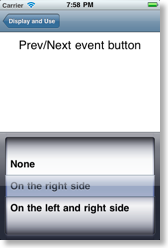
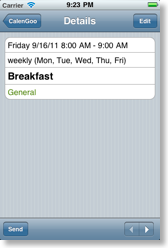
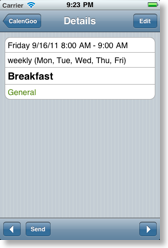
Enabling prev/next buttons in the detail view
Under “Settings”, “Display and Use”, “Expert", "Detail view", "Prev/Next event button" you can activate buttons to jump to the previous or next event of
the same day
:
This video here shows how it works: